

Learning Management System
Facilitating large-scale employee training | Desktop app, 2023
Offering clients a dedicated platform
▸ The Problem
The company that commissioned this project develops employee training programs for large organizations. Hitherto, their clients were responsible for uploading training materials to whatever learning management system (LMS) they happened to use, but this meant inconsistent implementation of materials and misdirecting the clients’ energy onto administrative upkeep.
▸ The Solution
My team and I developed a custom LMS that would increase the efficiency of the company’s training programs by streamlining the handoff of materials and providing users — trainees and administrators alike — with a uniform, intuitive platform.
Working within constraints
▸ The Challenge
The company had an extremely aggressive development timeline. It also, for client privacy reasons, didn’t permit direct access to its user data or to any of its users themselves. The design process therefore had to be adapted to the realities of the project.
▸ My Role
I led a team of two designers — Nurcan Gumus and Quenton Juma — and facilitated rapid development through constant communication with the CEO and feedback sessions with stakeholders, translating their input into sketches and wireframes.
Understanding users
▸ Building Upon Assumptions
The company shared a set of white papers that offered some user insights. We, the design team, also had various assumptions about LMS users based on our own experiences with employee training. These insights and assumptions together formed the basis of three user personas that would guide our thinking about how different types of people would use the LMS.

The Learner
Needs to gain proficiency in necessary job skills as quickly as possible so that they can dive into their work
Pain points:
Feels under pressure and even anxious when learning new skills
Afraid of seeming unqualified by asking questions or making mistakes
Doesn’t receive as much guidance as they’d like

The Manager/Coach
Needs to oversee employee training while also completing their other job responsibilities
Pain points:
Dislikes administrative minutiae, such as signing off on completed training modules
Frustrated when supervising training becomes very time consuming
Frustrated when they have to answer lots of questions or correct lots of errors

The Administrator
Needs to implement and facilitate training programs in their workplace
Pain points:
Has to organize and keep track of multitudes of training materials and data
Frustrated when they have to respond to problem reports and fix system errors
▸ Validating Assumptions
To see if our personas were accurate enough for us to move forward with design, we consulted training literature, as well as professionals themselves through a brief survey about their training experiences
Findings:
All of our personas' pain points were underscored repeatedly throughout sources.
We noted a strong tension between the desire for independence in training and the desire for guidance.
To resolve this tension, an LMS should facilitate training through an uncomplicated, intuitive interface.
Laying the groundwork
▸ Competitive Analysis
In order to meet our deadline, we had to borrow patterns liberally from existing LMS models. We consulted many platforms, and three prominent ones inspired us.



Key features:
Offers a map of the training program with time estimates
Shows the user’s progress toward completion
Enables users to make notes and ask questions
Interface:
Minimalist aesthetic with ample white space and small icons
Mostly light color palette, reserving darker shades for headers and major actions
Screen divided into a narrow left-hand navigation and a wider area for action
▸ Moodboard
The company already had a style guide for its website. Utilizing bold purples and blues and legible sans-serif fonts, it seemed perfectly suitable to the LMS. To confirm this, we gathered imagery reflecting ideas that were important for the LMS to convey to users:
Trust
Teamwork
Achievement
Simplicity
Modernity
The dominant purples and blues and the clean lines of the imagery confirmed that the existing style guide was, in fact, on point.

Developing the interface
▸ First Ideation
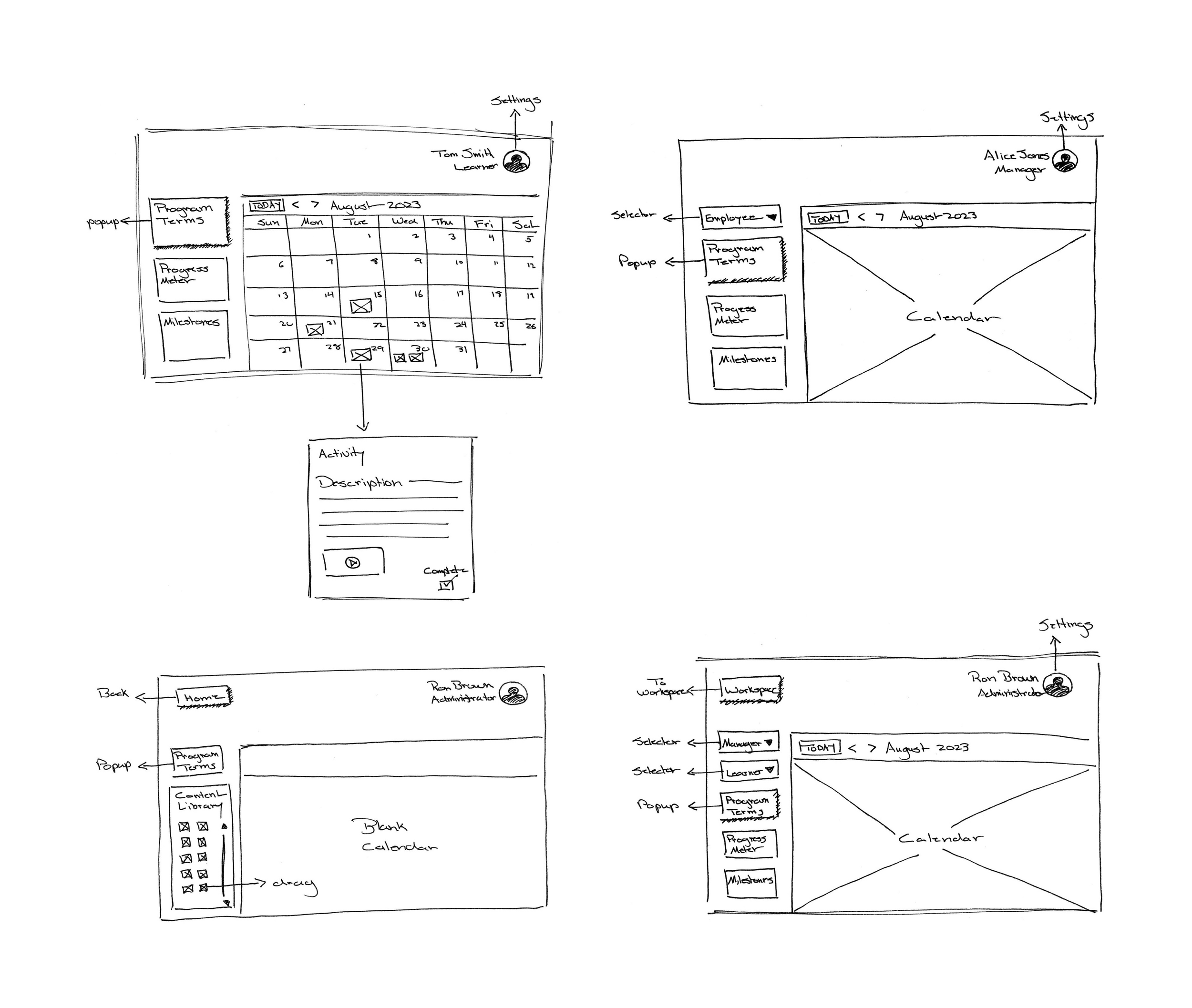
Our initial sketches proposed a basic calendar-centered interface for all user types. There was nothing innovative or glamorous about them, but they gave us something to share with the CEO to start gathering feedback.
▸ Refinement
Multiple rounds of feedback on the initial sketches resulted in somewhat more complex sketches capturing most of the necessary functionalities, allowing us to move on to wireframes.

▸ Wireframes and High-fidelity Mock-ups
Based on our final round of sketches, we built wireframes in Figma for all three user types, giving us our first complete view of the LMS. We also made rough color mock-ups of key screens. At last, we had something that was starting to look sort of like software, and we were ready to share our designs more broadly for feedback.
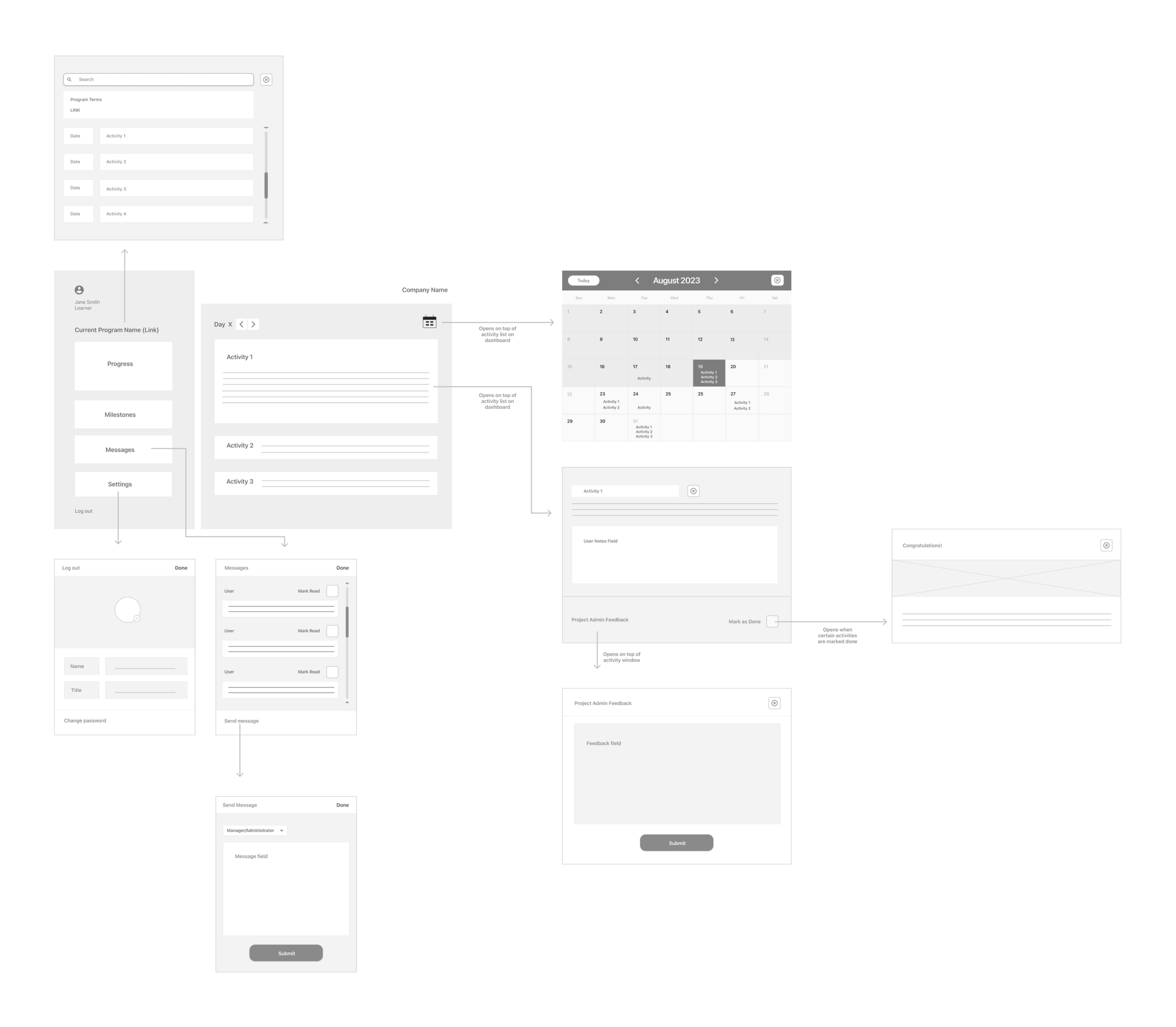
The learner interface, with its various screens and dialogue boxes
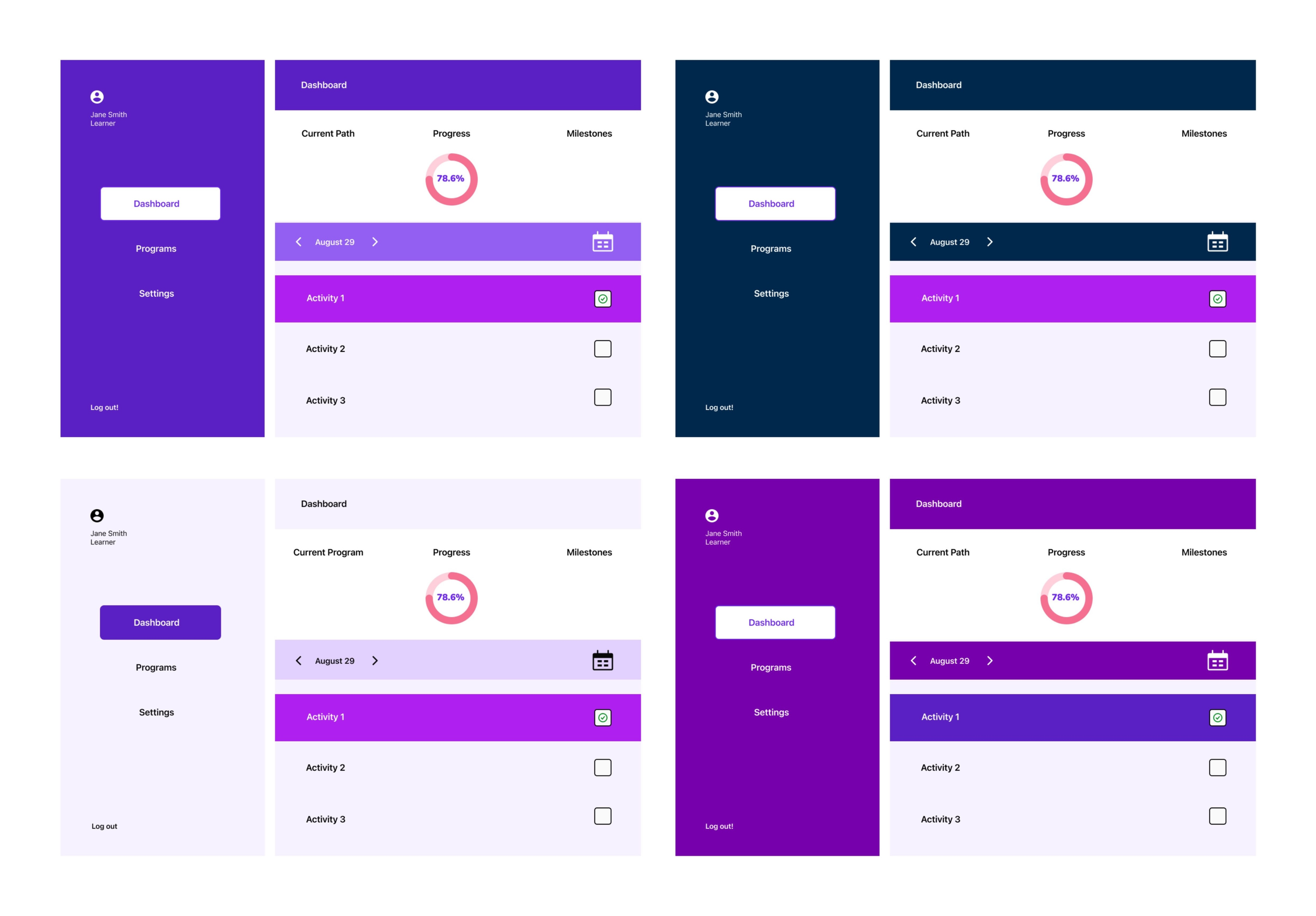
Color mock-ups of the learner dashboard
Validating the design direction
▸ Round 1
The CEO arranged for us to present our work to a group of stakeholders, including an administrator from one of the company’s major clients, a program designer from the company itself, and a representative from the team of engineers that had been contracted to build the LMS once design was complete.
Feedback:
Stakeholders requested no major changes to the existing interfaces, validating our design direction.
Stakeholders also requested two additional interfaces, one for employees who assisted managers/coaches with administrative duties and one for one for the company’s own administrators who were responsible for handing off training materials.
“I really like that this is simple … Most LMS’s are a nightmare.”
— Program Designer
▸ Round 2
After making revisions, we presented again to a larger group, this time including the entire engineering team.
Feedback:
Stakeholders requested no major changes, validating our revisions.
Stakeholders requested that the interface for employees who assisted manager/coaches be discarded because it was too similar to the manager/coach interface.
“It’s a lot of work to make something simple … It’s very tempting to add and add.”
— CEO
Handing off materials
▸ Deliverables
We now had a complete set of wireframes for all three user types, plus a host of design artifacts, all of which had been completed on schedule. We shared these with the engineering team for the next phase of development.
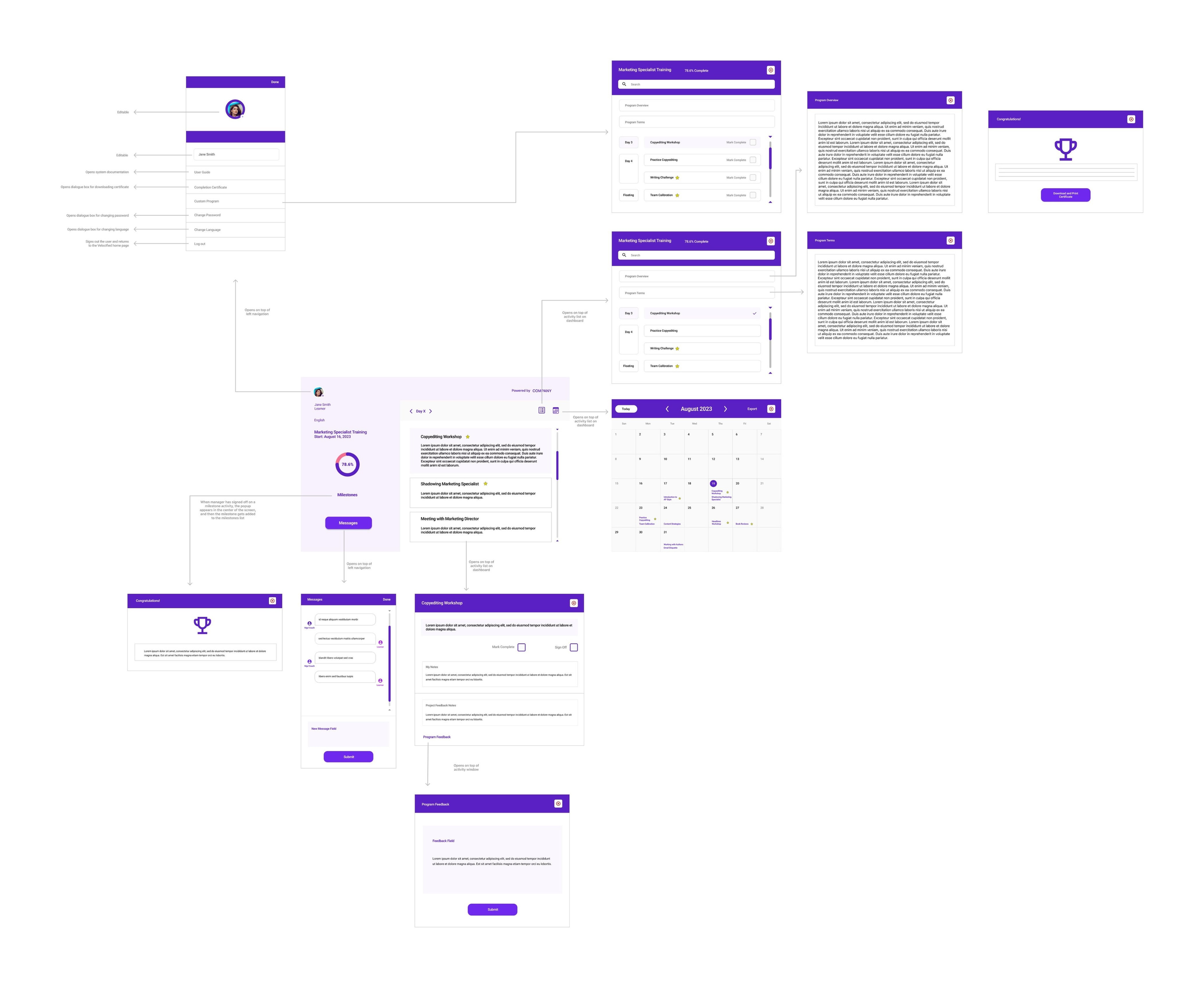
The learner interface in its fullness, now with color
“You really pulled it together and comprehensively captured our UX needs ... I really appreciate how quickly you responded to updates and changes and turning these around for our clients, consultant, and dev team to have the highest quality.”
— CEO