

assistER
Reducing the anxiety of patients waiting in the ER | Mobile app, 2022–23
Empowering patients with information
▸ The Problem
Across the US, ER wait times have been trending upward for decades. During the COVID-19 pandemic, they reached an all-time high, with reported wait times of up to 48 hours. Long ER wait times aren’t just a frustration, however. They correlate with significantly decreased patient satisfaction, which makes patients more likely to leave the ER without being seen or to avoid returning even when they need to, which puts their health at risk.
▸ The Solution
assistER is a mobile app that minimizes frustration and anxiety among people waiting in the ER by keeping them well informed and making them fuller partners in their health care experience.
Focusing on patient advocacy
▸ My Motivation
In the fall of 2022, my primary care physician had me visit the ER for tests related to what turned out to be just a migraine. I waited more than nine hours and often felt neglected or even forgotten. Other patients were similarly frustrated. Some, in fact, took their frustration out on the receptionists. I wanted channel my frustration into something constructive.
▸ My Process
I knew that the US health care system was a maze, particularly in terms of patient privacy laws, and I wasn’t a medical or legal professional. But even if I developed a solution that couldn’t readily be implemented, it would at least be an act of patient advocacy. I therefore took my time studying the problem, then developed a proof-of-concept for a mobile app.
Learning from experts
▸ The Literature
I had strong feelings about my own ER experience, of course, but I wanted to understand the problem of ER wait times in a broad context. I sought out existing data from the past 10 years, consulting medical journals, news stories, and health care websites.
Key findings:
ER wait times in the US are longer than ever and increasing.
Long wait times increase patients’ stress and decrease their satisfaction.
Dissatisfied patients are less likely to follow through with medical care.
Patients’ stress might be alleviated by keeping them better informed.
“Among the most stressful situations you may ever experience is sitting in the waiting area of a hospital emergency room while you or a loved one is in pain and discomfort from a sudden injury or illness. By its very nature, you may think, an emergency room is a place where waiting for care should never be necessary.”
— The Health Nexus, “In Case of an Emergency: ER Wait Times Explained and More”
▸ Competitive Analysis
If I was going to design an app that somehow addressed the problem of ER wait times, I also needed to take stock of apps that were already being used by medical institutions in the US to communicate with people. I focused my attention on two major types.


Patient Portal Apps
Patient portals are widely used by the US health care system. MyChart and Healow are the two most prominent examples.
Key features:
Capture patients’ medical history
Real-time test results and updates
Extensive functionality, including messaging, appointment scheduling, and billing
Limitations:
Extremely complex interfaces

Medical Communications App
Ease is a new app designed for communicating with patients and their loved ones during medical visits.
Features:
Text and video messages from medical staff
Streamlined interface
Limitations:
Users can’t send or respond to messages
Doesn’t capture medical history
Few functions and no use outside medical visits
Learning from patients
▸ Survey of ER Goers
To build upon my deepening understanding of ERs, I surveyed people who’d been to the ER in the US within the previous couple of years, which helped me to identify the principal types of ER users and their top challenges in the present moment.
Principal types:
Patients in noncritical condition
People accompanying patients in noncritical condition
Top challenges:
Long wait times
Not knowing how long the wait would be/frustrating paperwork
Unhelpful or rude medical staff

▸ Interviews with Survey Respondents
Of course, statistics can convey only so much about the human experience, so I contacted survey respondents to see if they’d be willing to discuss their ER pain points in greater depth. Six agreed to to be interviewed. All were adults under the age of 45 with no major health complaints. Some had been patients themselves, and others had accompanied patients. Much of what they said resonated with my own experience, and I took copious notes.
“I got kind of panicky, just because I didn’t know what was going on ... I didn’t know what the course of action was. I didn’t know what to expect. I didn’t know anything. And so already sitting there in pain worse than any I’ve really felt hardly ever, and then not being told anything about what’s going on with me ... It added to the fear.”
— Interview Subject
▸ Analyzing the Interviews
To translate my notes into a direction for design, I wrote the many things that the interviewees had said on Post-it Notes and grouped them according to commonalities such as what they felt while waiting in the ER, what they desired, and what they did.
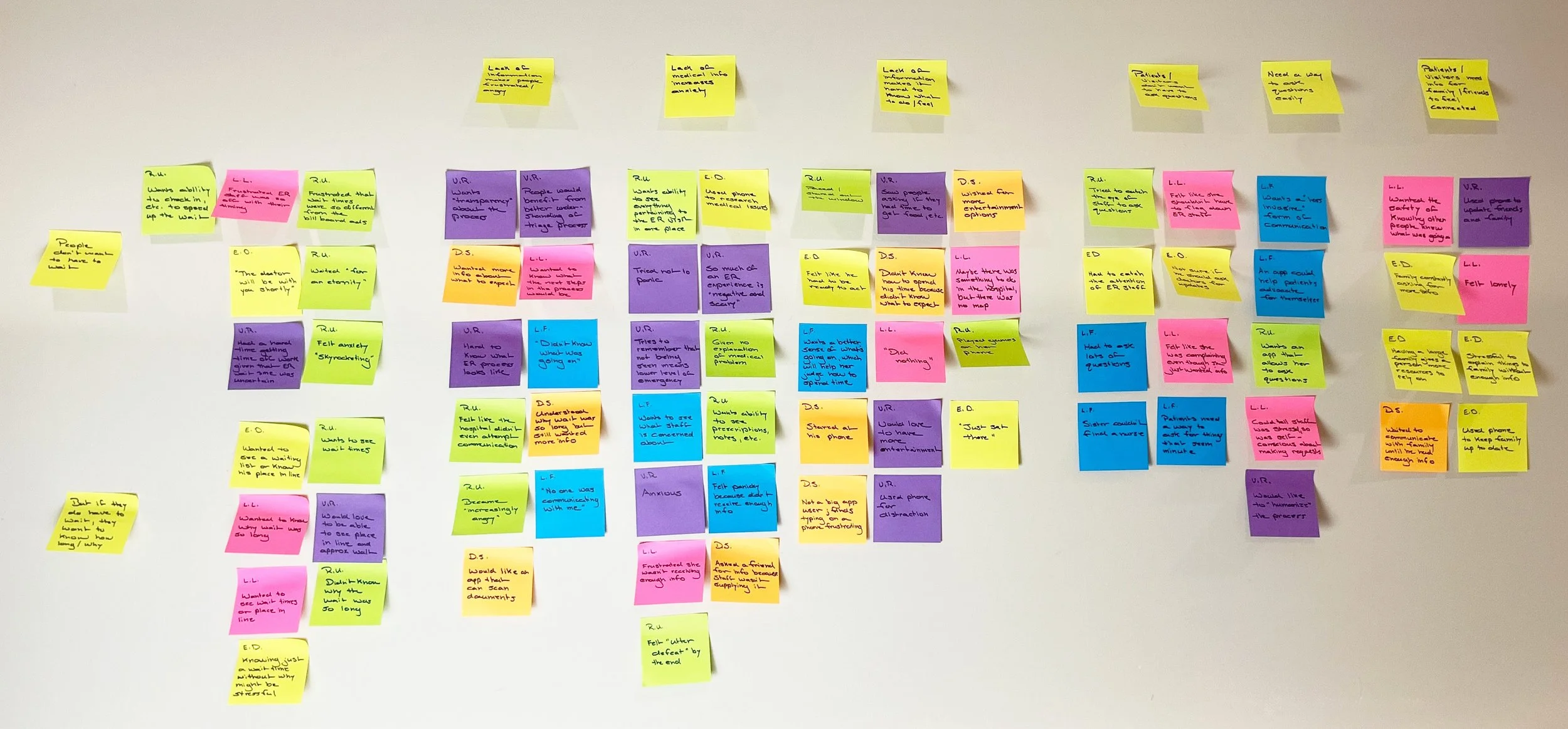
Shared traits of people waiting in the ER:
Strongly dislike having to wait for a long time
Want to know the expected length of the wait
Want to know why the wait is so long
Don’t know how best to spend their time
Are frustrated by lack of communication from medical staff
Dislike having to go to staff to ask questions
Want a simple, unobtrusive way to ask questions
Want information to share with family, friends, etc.
▸ User Personas
Based on these shared traits, I developed two user personas, one for each of the two major types of people who visit the ER. These would keep my thinking centered on diverse user needs, not just my own, throughout the design process.

The Independent Patient
Young professional with periodic minor health issues
Typically goes to the ER by themselves
Goal: Receive medical attention and return to normal life as quickly and painlessly as possible
Wants a simple way of gathering information to understand the scope of their visit, utilize their time while waiting, and update loved ones and coworkers

The Supportive Partner
Young professional in a relationship with someone who has periodic minor health issues
Typically accompanies their partner to the ER
Goal: Help their partner get through the medical experience and return to normal life as quickly and painlessly as possible
Wants to know the basic details of their partner’s ER visit so they can best help their partner without having to ask lots of questions
Generating ideas
▸ Ideation, Round 1
In a series of rough sketches, I began brainstorming possible ways to help the user personas achieve their goals in the ER, entertaining even fanciful ideas such as a cartoon virtual assistant — an idea that I quickly abandoned because I didn’t want the app to be seen as infantalizing users who were already feeling vulnerable or powerless.

This character, named Dr. X, was kind of cute, though.
▸ User Stories
While sketching, I simultaneously outlined the many ways in which users might engage an app during the stages of an ER visit, from creating an account to seeing the details of a follow-up appointment with their primary care physician or a specialist.

The first lines of a long list.
▸ Ideation, Round 2
Having plotted out and prioritized possible uses of the app, I selected the most practical ideas to explore further. My sketches revolved around a simple dashboard noting the user’s place in line, sort of like a minimalist version of one of the patient portal apps I’d looked at.

This already felt more like a real product than what I’d sketched previously — even if a part of me missed Dr. X.
▸ Information Architecture
A design direction was rapidly coming into focus, so it was time to map out the functions of the app thoroughly to determine what screens I needed to build, what functionalities they should capture, and how they should connect.
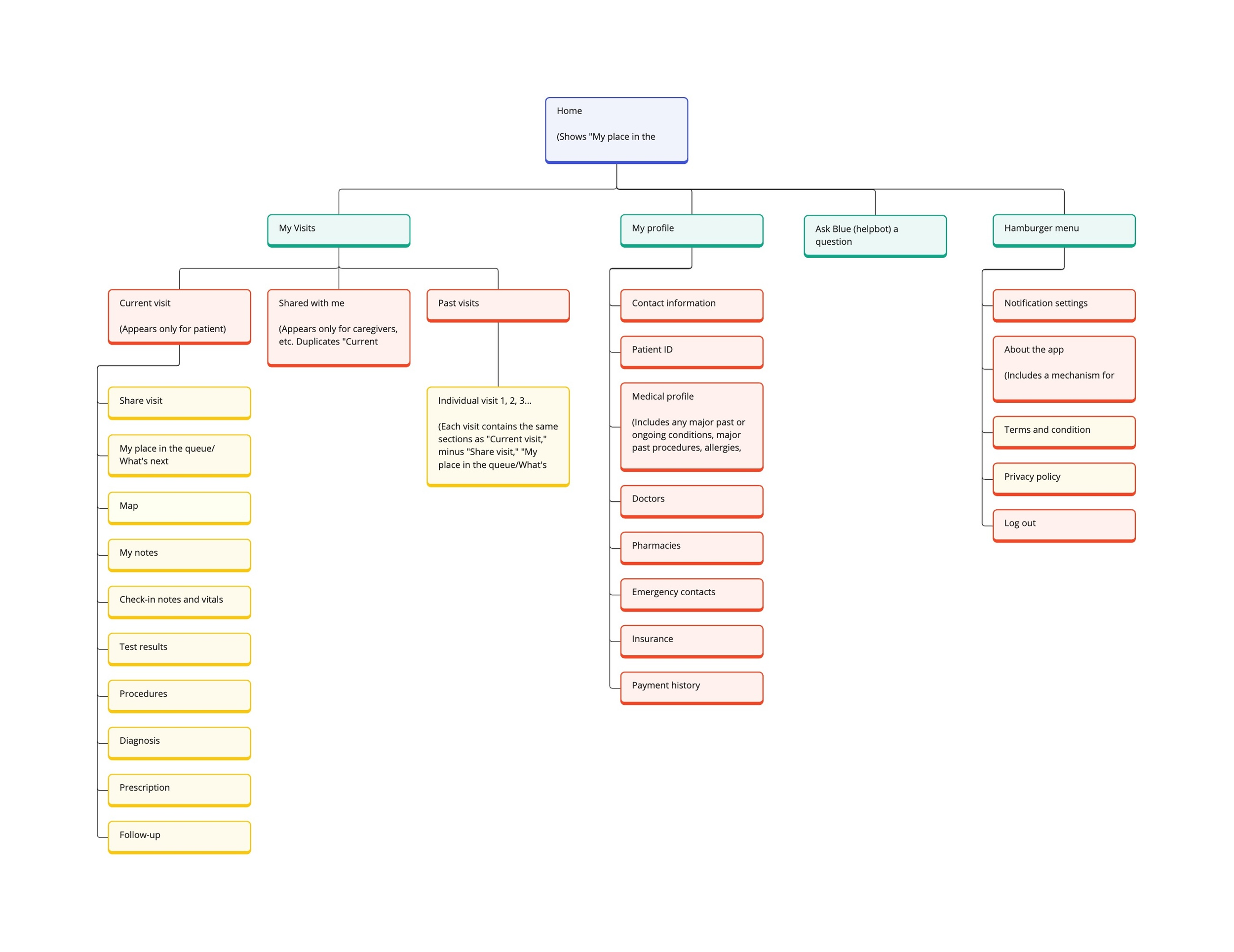
This diagram was to serve as a roadmap for the remainder of the design process.
Refining the interface
▸ Paper Prototype
I sketched the main screens on paper, scanned them, and used Marvel POP to assemble a rough, interactive prototype of the app to test on users so that I could gather feedback for revision before moving on to more sophisticated design software.
▸ Guerilla Testing
I recruited five people for in-person usability tests. I asked them all to imagine going to an ER for a minor ailment and waiting for a long time to be seen, and I gave them a set of scenarios to navigate, such as “You need to use the restroom. What would you do with the app to faciltitate this?” All participants successfully completed the scenarios, confirming the design direction.
“I like the simplicity … I don’t think that hospital apps should be complicated.”
— Test Subject
▸ Aesthetic
With the general shape of the app having been determined, the next step was to set the look and feel. I gathered imagery reflective of key ideas that the app would need to convey to users:
Guidance
Clarity
Reassurance
Reliability
Partnership
Imagery suggested a calming, muted color palette and simple, unadorned visuals.

Interfaces
▸ Interface Evolution
Moving from the paper prototype to the final design in Figma was a long process, and much of that time was invested in exploring a vertiable infinity of visual variations and making refinements to the interface as I went along.
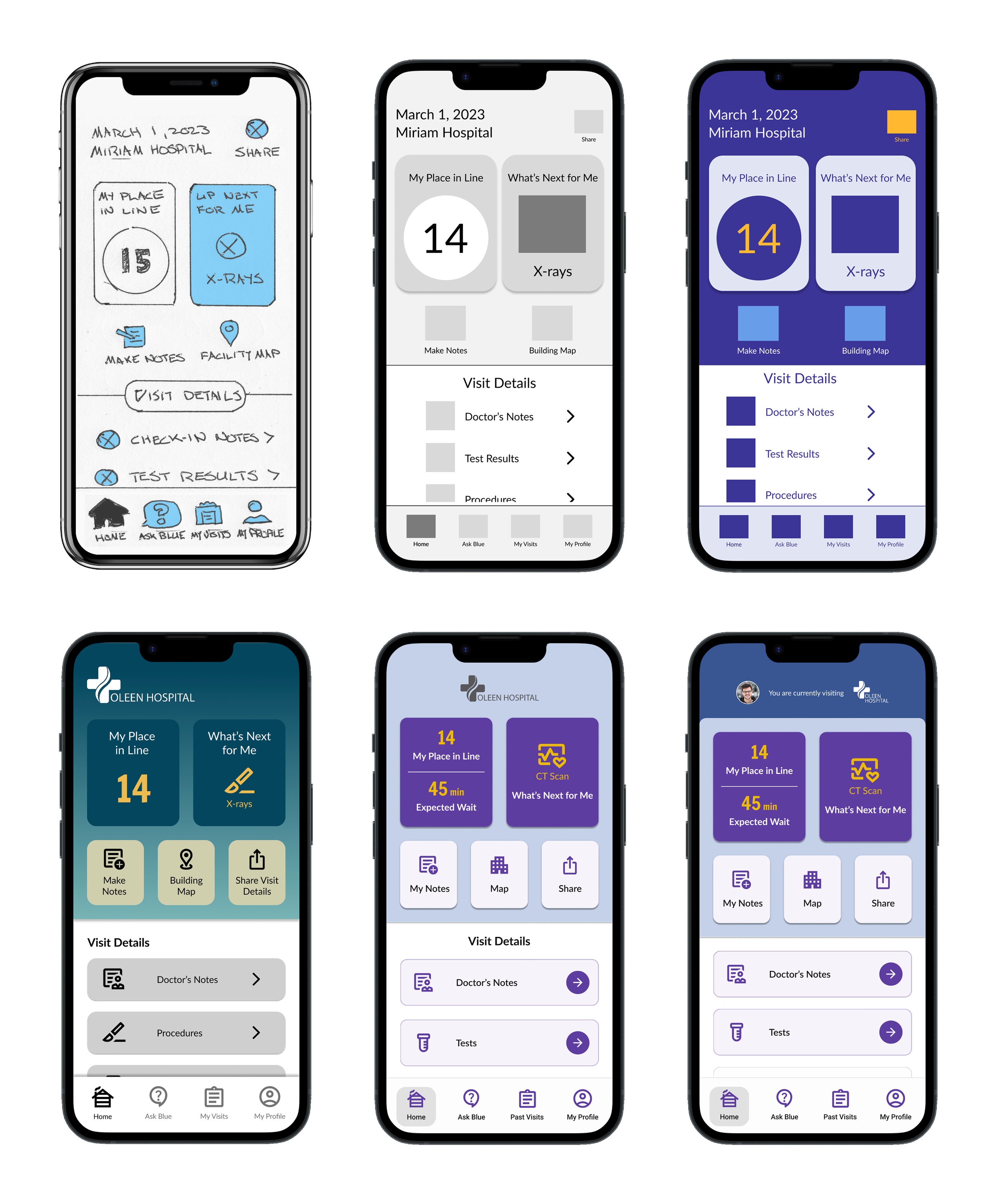
The paper prototype (top left) and the final desing (bottom right) and a just few of the many, many drafts in between.
▸ Final Key Screens

Home
A hub for the user’s current ER visit
Features:
Prominent status indicators for the user’s place in line, their estimated wait time, and what’s next for them in their ER timeline
Access to features that help the user to be more proactive during their wait: personal notes, a hospital map, and a function that allows sharing information with contacts
Access to data about the current ER visit, including doctor’s notes and test results

Ask Blue
A chatbot that answers the user’s basic questions and helps prevent overreliance on medical staff
Features:
Lets users select frequently asked questions from a list or type their own question
Offers standard answers, alerting staff only to complex questions or urgent needs

My Notes
A place for users to record information for personal use or to share with contacts
Features
Lets users write text-based notes or record voice memos
Lets users share notes with their contacts
Validating the design
▸ Usability Testing
I conducted two rounds of usability tests on the prototype, making revisions to the design between them. Each round involved five participants who were given a set of scenarios similar to those I’d given participants during guerilla testing, which helped me confirm what was working in the app and what needed further improvement.
Round 1 findings:
All participants successfully navigated the scenarios, validating the design.
Participants appreciated the features that helped users be proactive and suggested more.
Participants asked for more control over what the “Share” feature shared.
Round 2 findings:
All participants successfully navigated the scenarios, validating the revisions.
At first, participants didn’t understand that the “Home” screen pertained to the current visit.
Participants were curious about what the home screen would look like outside medical visits.
“I liked the simplicity and straightforwardness of the information. It was very clear where I was supposed to go to get what I needed.”
— Test Subject